This article contains answers to common questions about barcodes and QR codes:
- Can I keep the barcodes we're already using?
- Should I use barcodes or QR codes?
- Can I change an assets barcode?
- Why isn't the barcode scanning?
- What should I look for in a third-party asset tag?
- What type of label paper do I need to print QR codes?
- My printer is not printing the tags inside their sticker borders
Can I keep the barcodes we're already using?
You can use the barcodes you were using before implementing Fiix as long as they're compatible.
Barcodes can be printed or purchased independently and associated with assets in the CMMS. See Configure barcodes for more information.
Should I use barcodes or QR codes?
QR codes are generated by Fiix and associated with an asset, and can't be reassigned or transferred to another asset. Barcodes can be reused and reassigned to other assets. However the scanner in the work request portal (used to search for assets) can't register custom barcodes or QR codes with inverted colours. The mobile app scanner can register these codes. If you use the scanner in the work request portal, then we suggest using Fiix's in-built QR codes.
QR codes from Fiix need to be printed through the Fiix system, but barcodes can be ordered from a third party and assigned manually in the CMMS. You may choose one or the other based on your printing capabilities and the environment (requiring durability) the asset tags will be in.
QR codes are more easily scannable when damaged or dirty, and have fewer issues with interference and negative background effects.
We suggest that you choose QR codes if your environment is relatively clean and you have a label printer. You can print and reprint QR codes as required using your label printers, saving time and money in the long run.
In an environment where codes are more likely to be damaged and you need increased durability, you can order barcode asset tags that match your environment's needs.
Can I change an asset's barcode?
Barcodes can be reused and re-assigned to other assets.
Why isn't the barcode scanning?
When barcodes are damaged, too small, smudged, covered, or have light reflection (glossy finishes), they can be difficult to scan. Check if the issue persists between devices, cameras, or scanners. To fix the issue, you can try reprinting a new label, and reassign the asset a new barcode with an undamaged tag.
Also, the scanner in the work request portal (used to search for assets) can't register custom barcodes or QR codes with inverted colours. The mobile app scanner can register these types codes.
What should I look for in a third-party asset tag?
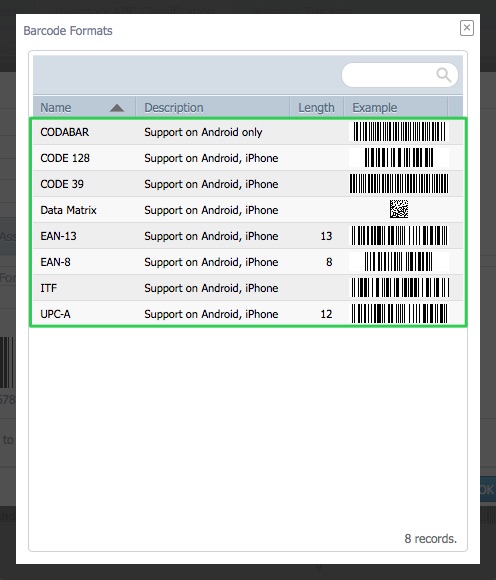
If you're purchasing barcodes, they must be one of the following formats:
- Codabar
- Code 128
- Code 39
- Data Matric
- EAN-13
- EAN-8
- ITF
- UPC-A
We suggest ordering a small sample of third-party asset tags and checking:
- Are they scannable on multiple camera devices, at various angles or with some interference?
- Can they hold up in your environment? UV light, chemicals, dust, oils, and more can all affect the code's readability.
- Ensure the size is readable and not too small (we recommend at least 22 mm or 7/8 inch)
- Look for quality and clarity of the print.
- Gloss finishes may be harder to read than matte finishes
What type of label paper do I need to print QR codes?
Fiix supports both label sheets and label rolls. See Choose QR code label paper for suggestions.
My printer is not printing tags inside their sticker borders
You can adjust printer settings to try to fix the issue of labels not printing inside their borders correctly.
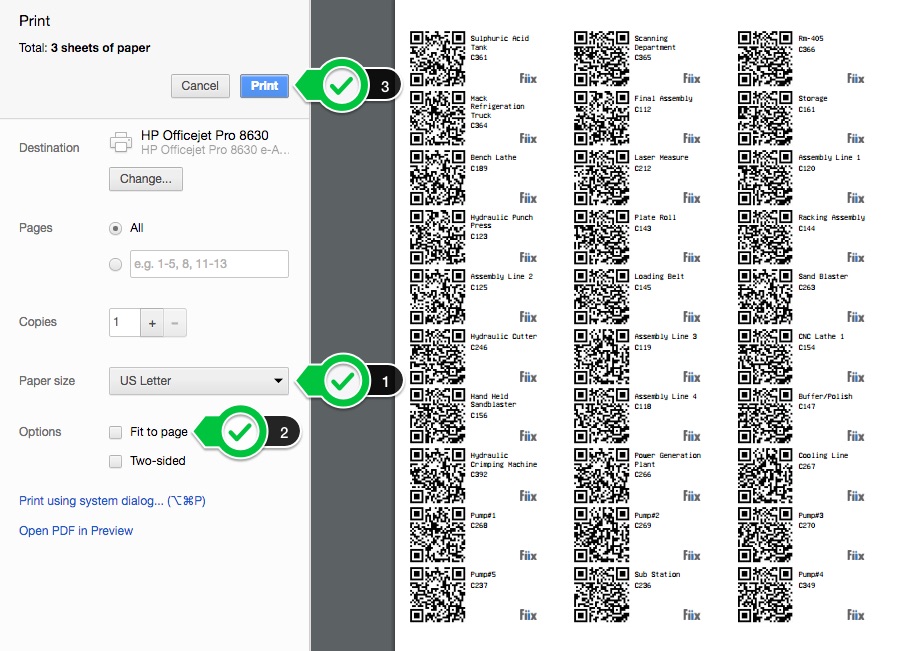
To adjust your label printing settings when printing from your browser:
- Choose Paper size: US Letter when using label sheets. In other situations, ensure the paper size matches your sheets.
- Uncheck Fit to page and other options that automatically adjust the print
- Change margin size to 0, "Borderless 8.5 x 11", or match margin sizes your paper (e.g. 1/8 inch x 1/2 inch for Avery labels)